
Notion Subscription with a Crypto Card: 2026 Business Guide
Notion Subscription with a Crypto Card: 2026 Business Guide
Notion does not accept crypto directly. Its billing runs through Stripe, which means any card you add must behave like a standard debit or credit card. A crypto card solves that gap: you fund it with stablecoins such as USDT or USDC, and it processes at checkout as an ordinary card. For teams that hold digital assets but still need everyday SaaS tools, this is often the simplest way to keep a Notion workspace on a paid plan without touching a traditional bank account.
This guide explains how Notion billing actually works, why cards get declined, how crypto cards fit into a business spend stack, and what to check before you put one on a workspace.
How Notion Billing Works

Notion Subscription with a Crypto Card: 2026 Business Guide - How Notion Billing Works.
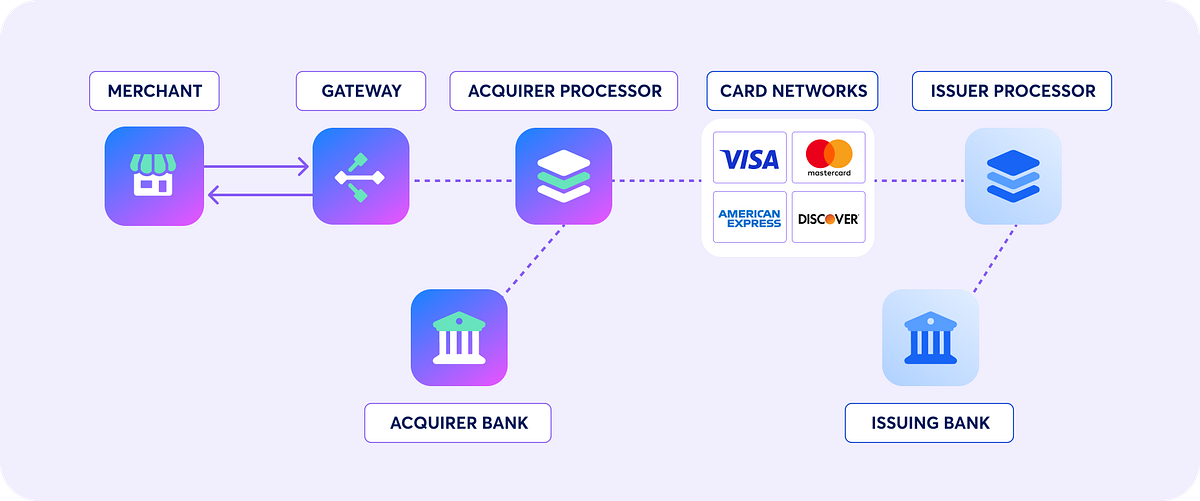
Notion processes payments through Stripe. According to Notion's payment methods help page, you can pay on the web with a debit or credit card, Apple Pay, or Stripe Link. On iOS, Apple Pay is the supported route, and in-app purchases are managed by the App Store or Google Play rather than by Notion itself.
A few practical points follow from that:
- Charges are upfront. If you pay by card, you are billed for the month or year ahead.
- The workspace owner pays. Plus and Business plans are charged to the account that owns the workspace, not to a random member's card.
- Stripe handles the risk checks. Declines are usually about billing address, card region, or 3-D Secure, not about an empty balance.
- Mobile subscriptions are separate. If you subscribed through the App Store, cancellations and refunds go through Apple, not Notion.
Why Notion Does Not Store Your Full Card Number
A common complaint is that you cannot fully remove a card from Notion's billing screen. That is because Notion uses tokenized payment processing: Stripe stores a token that represents the card, not the raw card number. The card details live with the processor, and Notion references the token. This is normal for Stripe-based billing and is generally a security feature rather than a bug.
Why Local Cards Get Declined on Notion
Notion Subscription with a Crypto Card: 2026 Business Guide - Why Local Cards Get Declined on Notion.
Notion bills in USD. If your card is issued in a region Stripe does not support well, or if it is a domestic-only card, the charge can fail even when the balance is fine. Freelancers and small teams in Southeast Asia, Africa, and the CIS region run into this often.
The usual culprits, in order of likelihood:
- Billing address mismatch. Stripe matches the postal code to the issuing bank. Non-US formats can soft-decline.
- Unsupported card region or BIN. A card that works locally may not work for a USD subscription.
- 3-D Secure friction. If your bank requires an OTP that the checkout never prompts for, the charge dies quietly.
- Per-seat billing jumps. Adding members raises the amount, which can re-trigger a region or address check.
- Wrong card on the workspace. The charge hits the workspace owner, so a personal card on a different account will not help.
How a Crypto Card Fits In
Notion Subscription with a Crypto Card: 2026 Business Guide - How a Crypto Card Fits In.
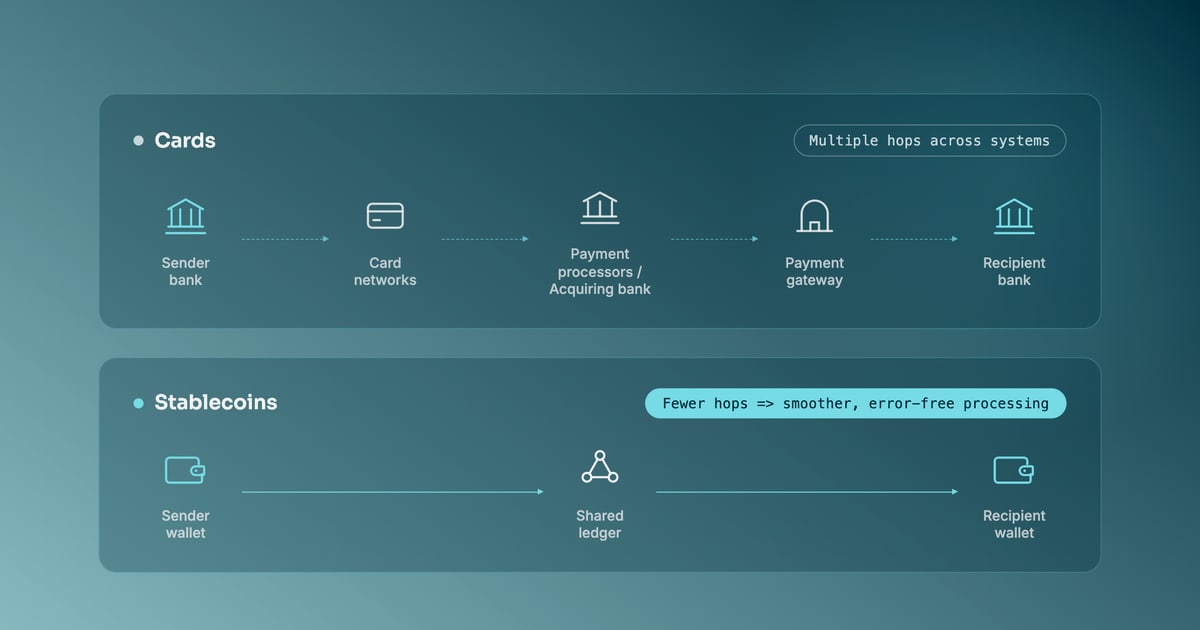
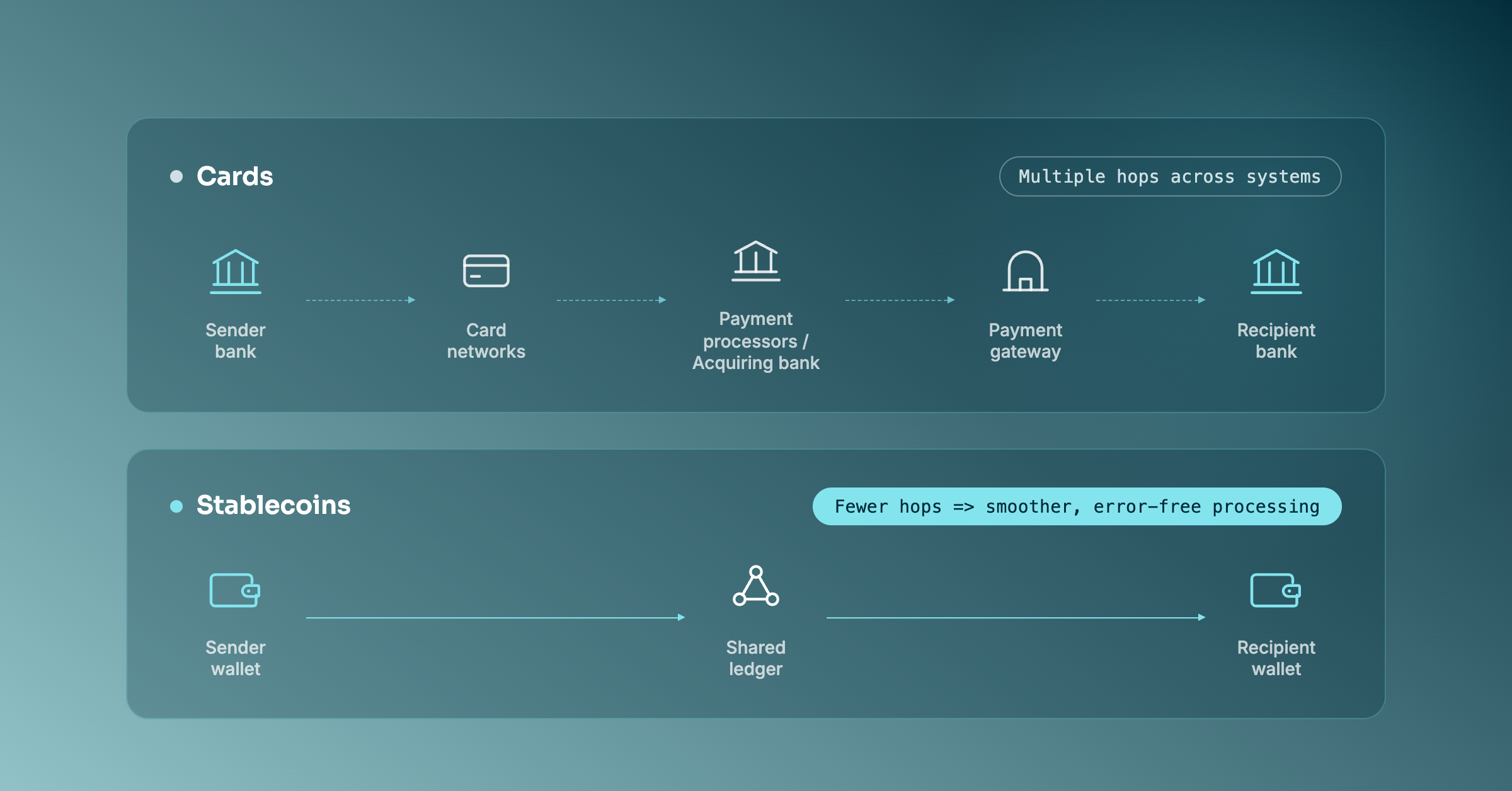
A crypto card is a card funded by digital assets. You top it up with stablecoins, and it settles merchant charges in fiat. To Notion and Stripe, it looks like any other card. To your treasury, it is a way to spend stablecoin balances without converting to a bank account first.
For individuals, the flow is short: create a card, load USDT or USDC, add it to Notion billing, upgrade the plan. For businesses, the flow is more interesting, because it becomes a spend-control question rather than a payment question.
What Businesses Actually Need
A single freelancer can manage one card. A company running Notion for a whole team, plus ChatGPT, Claude, Figma, AWS, and ad accounts, needs more:
- One funding account. Stablecoins in, cards out, without juggling multiple wallets.
- Per-card limits. A design team card should not share a limit with a Meta Ads card.
- Multi-currency settlement. SaaS bills in USD, EUR, and GBP; the card should handle that without manual conversion.
- Real-time visibility. Finance should see spend as it happens, not at month end.
- Custody you can explain. Segregated accounts and licensed custodians matter when the balance is company money.
This is where a platform like Cardfornia is relevant. Cardfornia is a Singapore-based fintech platform that provides crypto virtual cards for corporate businesses and startups. Organizations fund a single account with stablecoins such as USDT and USDC, issue multi-currency virtual cards to teams, and keep real-time control over operating expenses. Client funds are held in segregated accounts with third-party licensed custodians, and card issuing runs through licensed partners in jurisdictions including Hong Kong, the UK, the US, and Canada.
For a Notion subscription specifically, the useful part is not the card itself but the structure around it: one card for the workspace, a limit tied to your seat count, and a clean audit trail when finance reviews SaaS spend.
Paying for Notion with a Crypto Card: Step by Step

Notion Subscription with a Crypto Card: 2026 Business Guide - Paying for Notion with a Crypto Card: Step by Step.
- Decide who owns the workspace. The card must go on the account that pays for the plan.
- Create a virtual card. If you are a business, issue it from a corporate account rather than a personal wallet.
- Fund it with stablecoins. USDT or USDC on a supported network.
- Match the billing details. Use the address format Stripe expects. This is the single most common failure point.
- Add the card in Notion. Go to Settings, then Billing, then Edit method, and enter the card information.
- Upgrade the plan. Plus or Business, monthly or annual.
- Set a limit. Cap the card so per-seat growth does not surprise you.
- Watch the first charge. If it clears, subsequent renewals are usually smooth.
If you want a deeper walkthrough of the card mechanics, see our guide to instant crypto virtual cards for business.
Crypto Card vs Bank Card vs Apple Pay for Notion
| Method | Works with Notion | Best for | Main limitation |
|---|---|---|---|
| Local bank card | Sometimes | Teams in supported regions | Region and BIN declines |
| Crypto virtual card | Yes, via Stripe | Crypto-native teams, cross-border staff | Needs correct billing details |
| Apple Pay (iOS) | Yes | Individual iOS users | Mobile subscription managed by Apple |
| Stripe Link | Yes | Web users with saved cards | Still needs a card behind it |
If your bank card already works, there is no reason to change. The crypto card route makes sense when the bank card does not work, when your treasury is already in stablecoins, or when you want team-level spend controls on SaaS.
Where Notion Fits in a Crypto Business Spend Stack
Notion is rarely the only subscription. A typical crypto-native company pays for:
- AI tools: ChatGPT, Claude, Midjourney
- Design and dev: Figma, GitHub, Vercel
- Cloud: AWS, Azure, GCP
- Ads: Meta Ads, Google Ads, TikTok Ads
- Operations: Notion, Slack, Google Workspace
That mix is why a single-purpose card is limiting. You want one funding account, many cards, and limits that match each cost center. Ad spend in particular needs high limits and stable card behavior, because repeated declines can put ad accounts at risk.
For a broader view of how these cards work across vendors, see our B2B crypto card guide for stablecoin corporate spending. If you are comparing providers, the Cardfornia vs Reap vs OneSafe comparison covers custody, funding, and team controls side by side.
Common Mistakes to Avoid
- Using a personal card for a company workspace. Finance loses the audit trail.
- Ignoring the billing address format. Stripe is strict about postal codes.
- Sharing one card across teams. You lose per-team limits and attribution.
- Skipping 3-D Secure checks. Test the card on a small charge before committing to an annual plan.
- Assuming crypto is accepted. It is not. The card is what makes the payment work.
Related reading
- Instant Crypto Virtual Cards: 2026 Business Guide - Instant crypto virtual cards turn USDT or USDC into a spendable card in minutes. Learn how they work, fees, limits, and how businesses issue them at scale.
- Cardfornia vs Request Finance vs Sparados: 2026 Comparison - Compare Cardfornia, Request Finance, and Sparados on stablecoin funding, virtual corporate cards, spend controls, and global payments for 2026.
- Subscribe to ChatGPT with Stablecoins: 2026 Business Guide - OpenAI doesn't accept crypto directly. Learn how to pay for ChatGPT Plus or Pro with USDT or USDC using a stablecoin-funded virtual card, plus business tips.
Sources and further reading
- PSA: Notion doesn't let you remove your credit card from their site - Mar 16, 2024 ... This means that Notion does not have your credit card information. Instead it uses tokenized payment processing. Some of the information ...
- How to Pay for Notion Plus with a USDT Card (2026) - Notion rejecting your local card? Upgrade to Notion Plus or Business using a USDT-funded Visa. No bank account needed.
FAQ
Can I pay for Notion with crypto directly?
No. Notion bills in USD through Stripe and does not accept crypto at checkout. You fund a card with stablecoins and pay in fiat.
Does Notion accept a USDT or USDC card?
Yes, if the card processes as a standard debit or credit card. Stripe treats it like any other card, subject to the usual region and address checks.
Why can't I remove my card from Notion?
Notion uses tokenized payment processing through Stripe. The stored value is a token, not your full card number, so the billing screen may not offer a full removal option.
Why does my card fail when I add team members?
Per-seat billing increases the charge amount, which can re-trigger region or address verification. Match your billing details and use a card from a supported region.
Can one card cover a whole team workspace?
Yes. Put one virtual card on the workspace and set a limit that matches your seat count so member additions stay predictable.
How fast can I upgrade Notion with a crypto card?
Usually minutes. Create the card, fund it with stablecoins, add it to Notion billing, and upgrade. The first charge is the real test.
Is a crypto card safe for company subscriptions?
It depends on the provider. Look for segregated custody, licensed issuing partners, and real-time spend controls. Cardfornia, for example, holds client funds in segregated accounts with third-party licensed custodians and follows ISO/IEC 27001-aligned security practices.
Conclusion
Notion does not take crypto, but it does take cards, and a stablecoin-funded virtual card is a card. For individuals, that is a quick workaround for a declined local card. For businesses, it is a way to pay for Notion and the rest of your SaaS stack from one stablecoin treasury, with limits, multi-currency settlement, and a clean audit trail.
The decision comes down to your situation. If your bank card works, keep it. If it does not, or if your company already runs on USDT and USDC, a crypto card removes the friction without changing how Notion bills you.